"Windows cannot start this hardware device because its configuration information (in the registry) is incomplete or damaged. (Code 19)"
The error signifies that an registry error has occurred with the device in question, you can find a working solution as demonstrated below.

To fix this registry related Windows device driver error (Code 19), follow the steps as below :
- Navigate to Start -> Run and type "REGEDIT" and click "OK" to launch the Windows Registry Editor.
- Once started click "File" in menu bar and then Click "Export" from the drop down menu, now save the registry backup (All) just in-case things go bad.
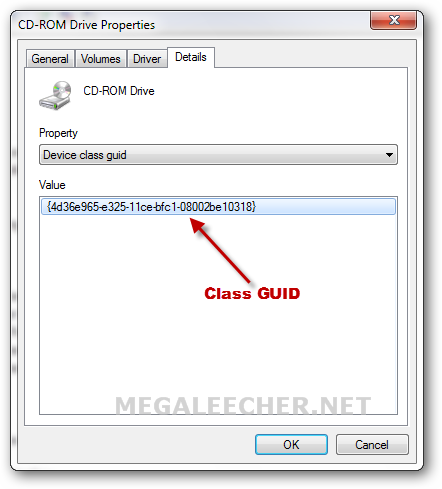
- Now from the faulty device driver properties page, make note of the "Device class GUID" as shown below.
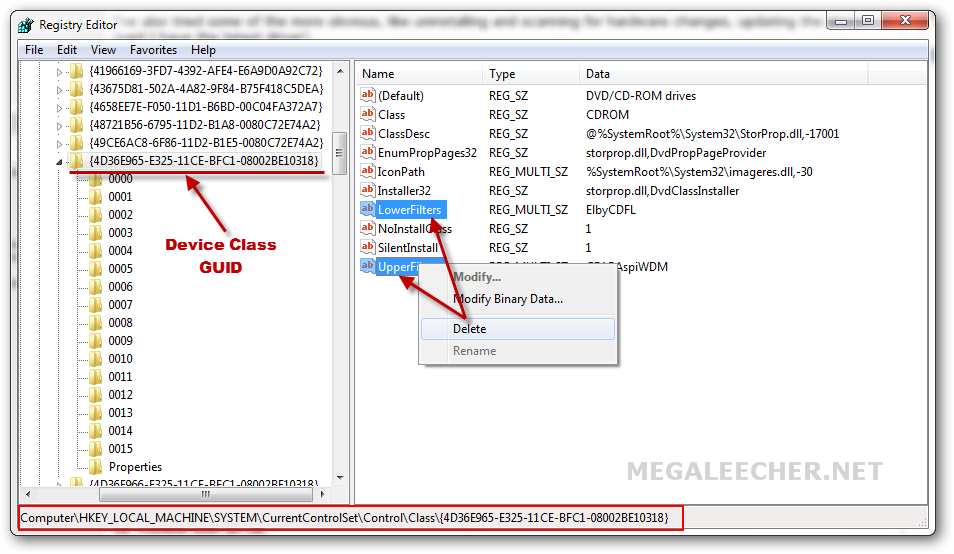
- Navigate to HKEY_LOCAL_MACHINE -> System -> CurrentControlSet -> Control -> Class key inside windows registry editor and then click the "GUID" noted down in step above, you will see something like below - select the "UpperFilters" and "LowerFilters" keys and delete them.
- Reboot your computer and the problem should be fixed.
Click to enlarge



No comments:
Post a Comment